VERSION 1.019
Fixes, changes and new features
DAZ has made changes to the the Product Library pages again so that the license status for all
products with licenses other than the Standard License now also includes the Standard License
instead of replacing it. This is supposedly and hopefully the last change to the Library pages DAZ has
made for now.
DAZ have also announced that all accounts now have been updated with the free 3dprinting licenses
for DAZ Originals purchased before July 12. 2022.
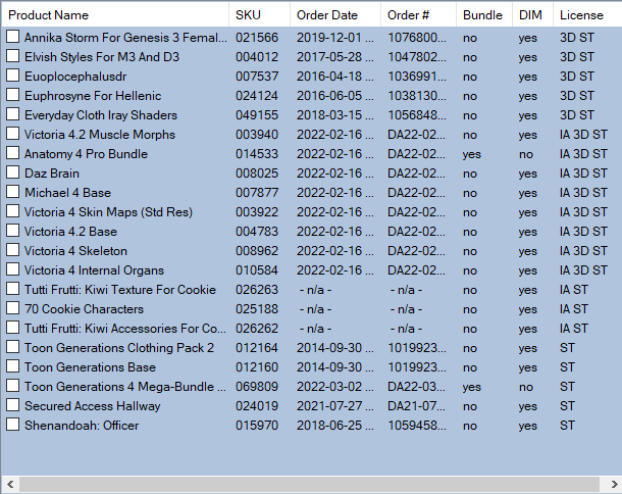
DAZ Product Manager 1.019 has been updated accordingly so that the Product Library pages and the
License field on the main Product List now reflect this latest change. The screen shot below shows
how the new format looks:
ST = Standard License
IA = Interactive License
3D = 3dprinting License
Library Page data downloaded with version 1.019 will automatically have the new format.
To update existing Library Pages and -data to the new format you need to update (delete and re-
download) all the existing Library Pages in your Product Data folder. This video will show you how to
update Library Pages/Data in general, for all products or selected ones:
Update Library Pages
The video was made with an older version of the program so the License data format that is shown
there is different from the new one, but otherwise everything works the same way.
Note that if you purchase new Interactive and/or 3dprinting licenses for products that you already
own and have downloaded data for, remember to update their Library Pages as well to reflect the new
license status.