VERSION 1.017
Fixes, changes and new features
Recently DAZ has started added free 3dprinting Licenses to all DAZ Originals purchased before July 12,
2022, to all DAZ user accounts. This has caused some changes to the Library Page data which are
breaking some functions in DAZ Product Manager 1.016 and earlier. The 1.017 release will fix these
issues.
But before you update to version 1.017 it is important that you first check that your account already
has been fully updated with 3dprinting Licenses.
In the beginning, when DAZ started updating the accounts, the active products (which have product
pages) had their 3dprinting licenses added first, then at a later point the inactive products (no product
pages) were updated for these accounts as well. I believe that accounts that are updated now have
licenses for both active and inactive products added at the same time but can’t say for sure.
Only DAZ Originals have been/will be updated automatically, for other products and for DAZ Originals
purchased after July 12, 2022, you must purchase one if you want a 3dprinting license. If you already
have purchased some, be careful not to confuse these with those DAZ are adding/have added
automatically, when checking.
To check if your account has been fully updated with 3dprinting licenses, go to your Product Library in
the DAZ Store and find some DAZ Originals which:
1. were purchased before July 12, 2022.
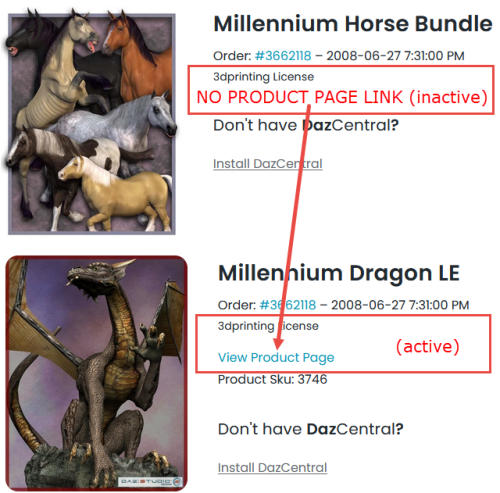
2. don’t have a product page link (inactive product)
Check that both active and inactive DAZ Originals products have the 3dprinting License added, as
shown here:
If you only see either “Standard License” or “Interactive License” on your DAZ Originals your account
hasn’t been updated with 3dprinting Licenses yet. In that case you should wait with updating to
version 1.017 until it has.
If however you account has been updated, just proceed:
Unfortunately you need to delete and re-download all Library Pages in DAZ Product Manager to update
the Library data so they are compatible with the program update. To do this you must first update to
version 1.017, using auto-update (Help > Check for Updates) or using this download link. Just
replace ProductManagerDAZ.exe with the new version.
After updating, watch this video which will show you how to update your Library pages and -data in
general, if needed:
Update Library Pages
New users who don’t already have any data downloaded with 1.016 or older versions can just
download the full 1.017 version from the product page, it will work right out of the box, no need to do
anything special.
That’s basically it. Any problems, questions or comments, just email support@taosoft.dk, or use the
online form (Help > Report Bugs in the program menu).