VERSION 1.004 / 1005
Fixes, changes and new features
New Features: support for AND and Exclude, in Product Name search.
AND: the search result will include only products whose names contain all the words in the search
query.
Exclude: used together with AND to exclude products whose names contain certain words / single
characters (genesis generation numbers).

Current Search features in general
Search ignores case, so you can just use lower case for convenience. Leading / trailing spaces in
search query will be ignored in all cases and not cause any problems.
Exact Match:
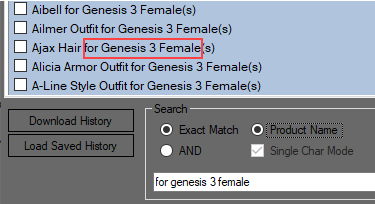
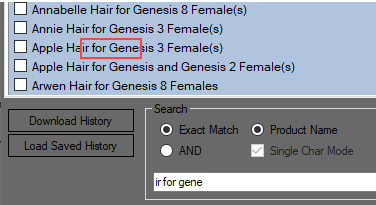
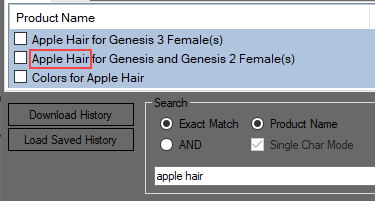
Will list all products whose names contain or are equal to the exact search string. Number of
spaces between words/characters must also match exactly:
NOTE: in the following a “word” means any single character or combination of characters
surrounded by spaces, e.g. “ genesis ” or “ 8 ” both count as a word.
AND:
Enter several words to find only products whose names contain all the words as exact or partial
matches. E.g. “genesis 3 female” (= genesis AND 3 AND female) will match both “genesis 3
female”, “genesis 3 females” and “genesis 3 female(s)” as well as “genesis 3 female hair” or “
female shorts for genesis 3”. The same will “gen 3 fem” (genesis 3 female) but that will also
include products whose names contain any of these words partially, e.g. “generation 3 female”.
So try to use the shortest form of the words but without abbrevations, i.e. “female” and not
“fem” or “females”, or “hair” and not “hairs”, that will produce the most precise matches.
The order of the words doesn’t matter, e.g. “hair 2 female genesis” will produce the same result
as “genesis 2 female hair”.
AND search is in this program furthermore designed to make it easy to separate female and male
products. To find all genesis 2 male hairs products for example just include the exact word
“male”, e.g. “genesis 2 male hair”. To find all genesis 2 female hair products use “genesis 2
female hair”. Hairs that include both male and female versions, e.g. “Buenaventura Hair For
Genesis 2 Female(S) And Male(S)” will be included in the search result in both cases. It’s not
100% precise as products whose names contain e.g. “Malene” or “Malea” will be included also,
but such cases are quite rare in this context.
Note that AND by nature expects at least two separate words in the search query. If you just use
a single word AND will generally just work like Exact Match, it’s when using multiple words that
AND and Exact Match produce different results. AND and Exact Match also differ in that with
AND the number of separating spaces between words doesn’t matter, i.e. “genesis 3 8 male hair”
and “genesis 3 8 male hair” are equally valid.
Single Char Mode (AND only):
By default, when using AND, “genesis 3 male” will also match “30 morphs for genesis 2 male”
or “3D glasses for genesis 8 female” because the word “3” partially matches “30” and “3D”. By
enabling Single Char Mode, “3” as single character will only match “3” as an exact word (a
single character enclosed by spaces), and therefore not as part of another word.
Exclude (AND only):
Exclude (“!=”) is a search parameter that can be used together with AND, with which you can
narrow down the result by excluding products whose names contain certain words. Any product
whose name contains one or more of the selected words will be excluded from the search result.
To use Exclude just enter the exclude parameter “!=” enclosed by spaces after the primary
search phrase, followed by the words you want to use as exclude criteria. If AND is not selected
it will be selected automatically when you start the search, when using the exclude parameter.
For example, “genesis 3 female != poses hair dress” will exclude all matches that also contain
one or several of the words after the “!=” parameter. Note that Exclude, contrary to AND,
matches exactly, so to exclude both “pose” and “poses” you must include both words, as in
“genesis 8 female != pose poses”. Also note there must only be a single space between exclude
words or you may get different results in some cases.
If you don’t enter a specific search phrase and just type e.g. “!= poses expressions hair dforce” it
will list all products except those containing the exclude words.
The number of exclude words you can use is theoretically unlimited but search speed will be
slower the more words you use.