
PRODUCT MANAGER FOR DAZ3D
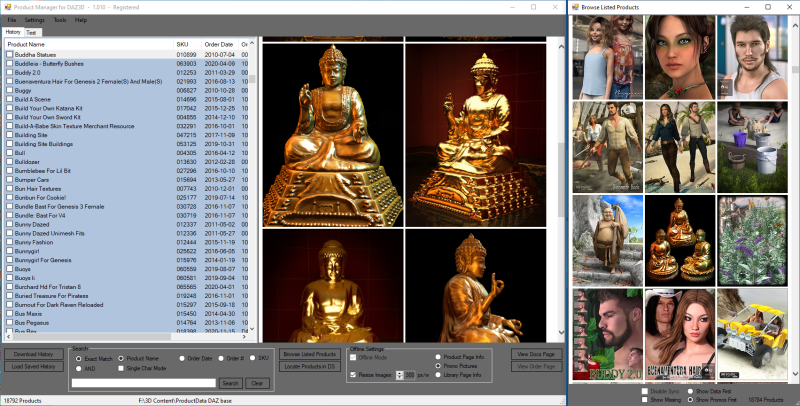
This program is now FREE
Basic features:
- Complete offline database of your DAZ Purchase History, downloaded/updated in less than a minute
- Links DIM (DAZ Install Manager), DAZ Product Library data, and DAZ Studio together in a way that makes it very easy to find ALL parts of your products in DAZ Studio's Product Library, no matter how disorganized or mislabeled they are.
- Download promo images, product page data, product library page and ReadMe PDF (new) for all your products to local database, for fast offline browsing
- All products on one list (no pages)
- Sortable data columns (Product Name, SKU, Order Date, Order#, Bundle, DIM ready, License Type)
- Fast search feature with AND and Exclude, specifically designed for DAZ content search (male, female, generation, type)
- Check for and download program updates automatically
- Advanced Data management with easy updating, restoring, veryfying and backing up data, ensuring no loss of non-recoverable data
- And much more...
"Browse All" feature:
This feature will open a window showing an icon of the first promo image for every product listed in the list view (left pane). Click on an icon to select the product on the main list, multiple clicks will toggle between displaying product data or promo pictures. The content will automatically sync with the product list in whatever you do (search, sort, list all products).
"Locate Products in DAZ Studio" feature:
Locate all parts of any installed product in DAZ Studio with a couple of clicks. This feature also includes a temporary product group where you can easily add and remove products of your choice for easy access (e.g. for a project you're working on). NOTE: requires DAZ Studio General Release 4.12.1.117 and later. It also require that you use DIM (DAZ Install Manager) for download and installation of products, with access to the DIM Manifest Files for the products. See demo video here: https://www.screencast.com/t/ofZEsVpkwyN
Search Feature:
The program has some advanced search features with AND and EXCLUDE, specifically designed for DAZ Content so it's easy to find content from the different Genesis generations, e.g. "genesis 3 female hair" or "genesis 8 male poses". Se demo video here: https://3dcontentmanagers.com/software/pm-daz/doc/SearchDemo/
Documentation:
Currently the documentation consists of a version history of the program, showing new features and changes for each new version released of the program. Though everything is fully documented here, except the Product Data Manager (which is mostly used for fixing issues that rarely occur), this format can be a bit confusing and with a lot of obsolete info and probably some errors, but it's all there is now. I hope to have it rewritten and updated to a better format soon.
The current documentation can be accessed either via Help > Online Help in the program, or this link: https://3dcontentmanagers.com/software/pm-daz/help/
Also, the current version 1.027 has a new networking feature. The "lpn" folder in the installer zip contains a tutorial about that.
Requirements:
Windows 7, 8, 10 or 11 (not tested on 7 or 11, but should work), and .NET framework 4.6.
Enough disk space for your product data, consider at least 6 GB per 1000 products if you download all promo pictures (default). The newer the products are, the more space their data take up, generally.
Installation:
Just extract all zip content into a folder of your choice and run ProductManagerDAZ.exe. Do not place the install folder inside the Windows "Program Files" or "Program Files (x86)" folders as it may not work correctly here. You can use the ProgramData folder instead (this system folder may be hidden by default).
Removing the program: Except for a setting (Browser compatibility) which creates a single registry entry, and whatever references Windows itself creates to the program, it leaves no traces on the system if you remove it. Just delete the program folder and (unless you want to keep the downloaded data), the data folders (Product Data and Backup folders), and all is gone.
NOTE: Antivirus programs may consider the program harmful and block or quarantine it because the code is obfuscated*, in this case just add it to the AV program's exclusion list and it should work. You can also upload it to the AV vendor's site to have it whitelisted, most (if not all) AV companies offer this service, sometimes the AV program itself has a built in upload feature.
* obfuscation = source code protection by encryption, makes some virus scanners suspicious
You can see test results from virustotal.com for the current version of ProductManagerDAZ.exe before and after obfuscation here:
Virus report before obfuscation
Virus report after obfuscation (the file you download) - or you can upload the ProductManagerDAZ.exe file to virustotal.com and it will automatically show the test report for the file.
If there only are a few scanners that flag the file as malicious, it's normally considered false positives. MaxSecure is known to cry wolf all the time, read more here: https://hackerdose.com/malware/trojan-malware-300983-susgen-false-positive/
NOTE 2: Some DAZ accounts have an issue which makes History download fail. If you experience this, there is a workaround. Just contact our support for how to fix that.
Any problems or questions, just use the contact form ("Report Bugs" under Help in the program) or use the direct link: https://taosoft.dk/support
Download
This program is now free. If you find it useful, you can donate to support development, if you like.
Please read before downloading:
The downloaded file is running in Demo mode, limited to downloading data for 250 products.
There are several reasons for this, one is that in order for all features in the program to be functioning correctly and not throwing messages about missing data etc. which may be confusing for new users, product data for all products in your account history must have been downloaded.
Since many have thousands or even tens of thousands of products in their accounts, the Demo version simulates that you only have 250, and will therefore work normally when you have downloaded data for these. This way you can test the program without having to download a lot of product data only to find that you're not interested in the program anyway.
If you like it then just request a key, to unlock the full version. To do this, click "Support" in the program's Help menu, this will take you to the support form. Enter you name or prefered alias and a contact email address to have key sent to, and then put "Request key PM-DAZ" in the comments field.
The key is a lifetime key and will work for all future versions of the program.
Version 1.029, 2026-06-24 (see Change Log)
Full version: pm-daz-1029-full.zipUpdate from 1.024 - 1.028: pm-daz-1029-upd.zip
For updating, just extract the content of the update file into the Product Manager program folder, overwriting any existing files.
COPYRIGHT © 3D CONTENT MANAGERS 2026